Self-Hosted Ad Blocking Over WireGuard, Without Opening Port 53 to the World
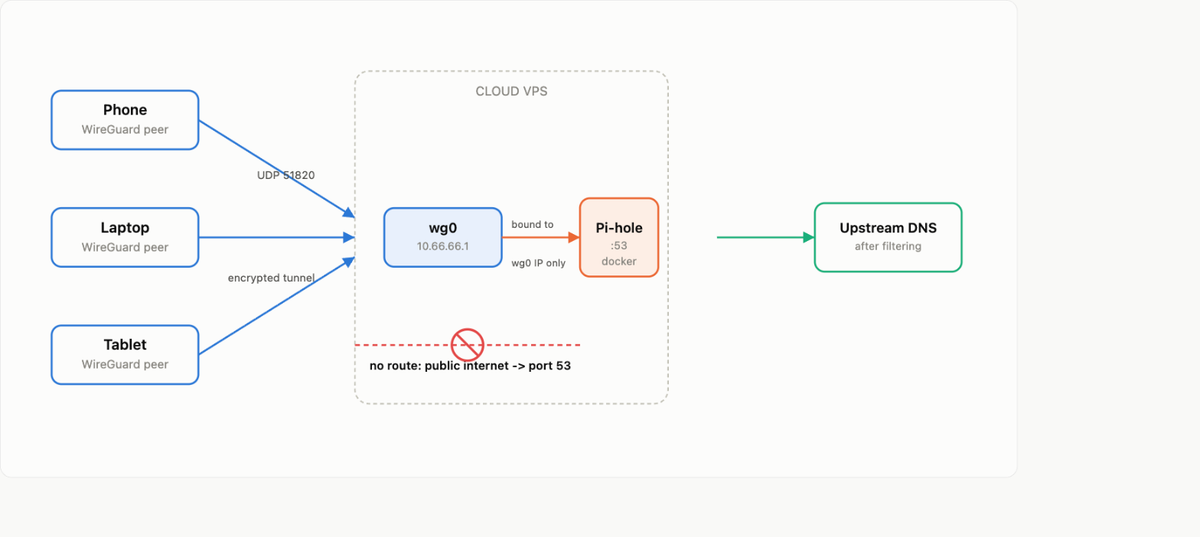
I run a small self-hosted stack on a cloud VPS (Coolify managing a pile of Docker services). I wanted network-wide ad blocking on my phone and laptop, using Pi-hole as the DNS resolver. The catch: the server is remote, there is no LAN between my devices and the box, and the one hard rule I set for myself was that port 53 must never be reachable from the public internet. An open DNS resolver on a public IP is a classic DNS amplification abuse vector, and cloud providers will suspend your account for it.
Here is the full path from "container will not start" to "ad blocking works from anywhere, with a firewall that actually holds."
The setup
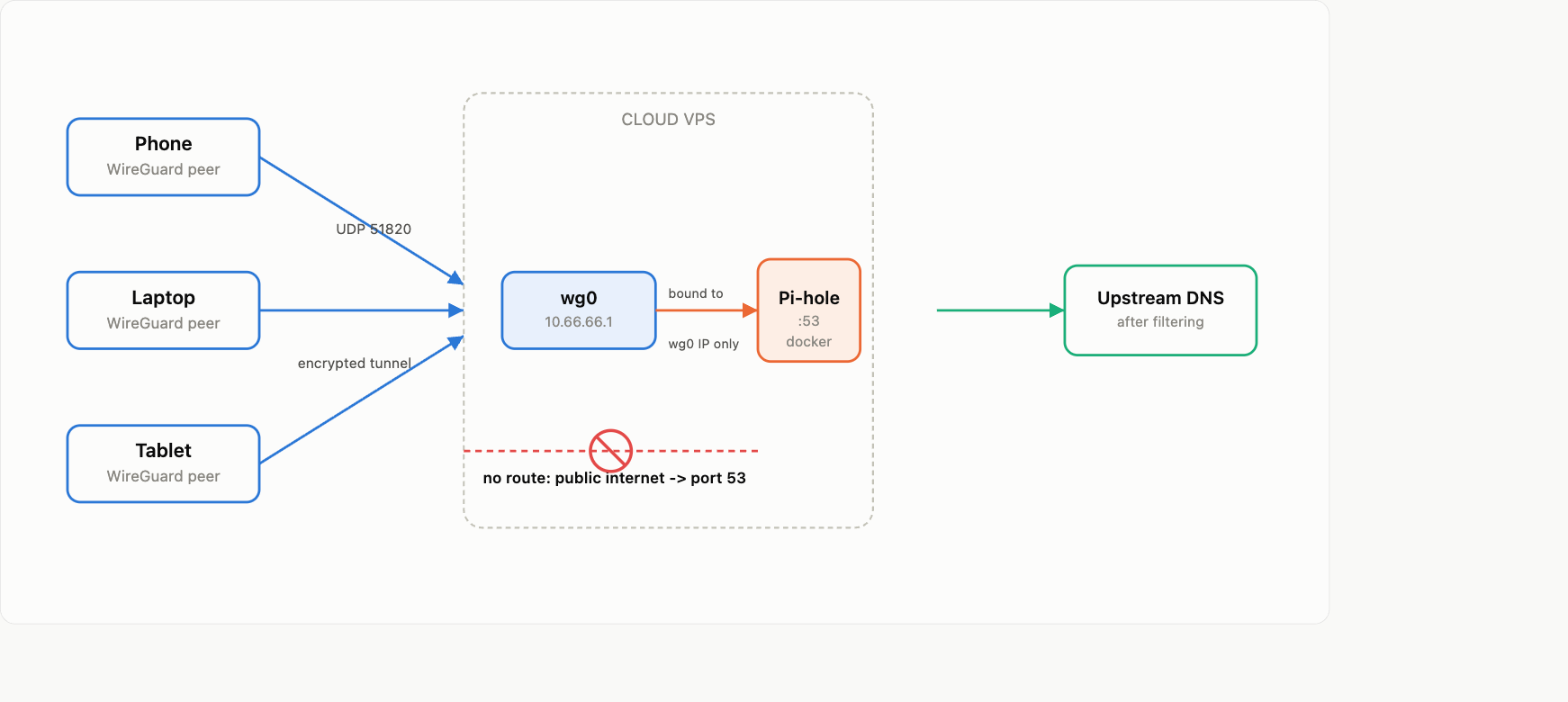
Devices connect over a WireGuard tunnel to the VPS. Pi-hole listens only on the WireGuard interface's IP, never on the public one. There is no rule anywhere, not in the cloud firewall, not in iptables, that lets a public-internet packet reach port 53. If the tunnel is down, DNS is unreachable, full stop.
The first problem: Pi-hole would not start
Deploying Pi-hole through Coolify failed immediately:
failed to bind host port 0.0.0.0:53/tcp: address already in useRoot cause: systemd-resolved already holds 127.0.0.53:53 and (on newer Ubuntu) 127.0.0.54:53 for the host's own DNS stub resolver. Docker's default port publishing binds the wildcard address 0.0.0.0, which collides.
The tempting fix is to disable systemd-resolved. Do not do this, it is what the rest of the host uses to resolve names, and killing it has a way of taking down things you did not expect. The actual fix is to stop asking Docker for a wildcard bind and instead bind the published port to one specific interface address, the WireGuard interface's IP, which the wildcard bind was never yours to claim on this host.
Why binding to a specific IP is the fix, not just a preference
This is the part that is easy to get wrong. I assumed the host's firewall (a default-deny iptables INPUT chain) would protect a wildcard-bound container port from the public internet even if I never got around to fixing the bind. That assumption is false, and worth understanding if you run anything in Docker on a box with a restrictive host firewall.
Docker manages its own chains in the nat and filter tables. A published container port gets a DNAT rule in PREROUTING and an ACCEPT in the DOCKER chain, both of which sit ahead of your own INPUT chain in the packet's path. Your host-level default-deny policy on INPUT simply never gets consulted for traffic destined to a published container port. If Pi-hole had bound 0.0.0.0:53 successfully, it would have been reachable from the public internet regardless of what my iptables -L INPUT said, because Docker's own rules would have accepted it first.
Binding to a specific address closes this at the source: Docker only opens the DNAT rule for that one IP, so a request arriving on the public interface has nowhere to match.
The fix, in the compose file
Original (broken and, if it had started, unsafe):
ports:
  - '53:53/tcp'
  - '53:53/udp'
  - '67:67/udp'
  - '123:123/udp'
cap_add:
  - NET_ADMIN
  - SYS_TIME
Fixed:
ports:
  - '10.66.66.1:53:53/tcp'
  - '10.66.66.1:53:53/udp'
cap_add:
  - NET_ADMIN
10.66.66.1 here is the VPN interface's own address on the server, substitute whatever your WireGuard (or Tailscale, or plain VPN) interface IP actually is. A few other cleanups while I was in there: dropped the DHCP (67/udp) and NTP (123/udp) port mappings since I was not using Pi-hole for either, and NTP on 123 would have collided with chrony later anyway. Dropped the SYS_TIME capability for the same reason, Pi-hole does not need to set the system clock if it is not doing NTP. Kept NET_ADMIN, Pi-hole's FTL engine needs it. Kept FTLCONF_dns_listeningMode=all, that is an internal FTL setting about which internal interfaces it answers on, not a host exposure setting, easy to confuse the two.
Redeploy, then verify from the server itself:
# bound only to the VPN interface, no wildcard
ss -tulpn | grep ':53'

# resolves normally through the tunnel address
dig @10.66.66.1 example.com

# ad domain should come back null-routed
dig @10.66.66.1 doubleclick.net

# the public IP should not answer at all
dig @YOUR.PUBLIC.IP example.com
The last one is the check that actually matters. If that times out or returns "no servers could be reached," you are done. If it answers, stop and fix the bind before doing anything else.
Getting devices to the tunnel
Each device needs its own WireGuard keypair and its own peer entry on the server, sharing one keypair or one config across two devices is not an optimisation, it is a bug: the server tracks one active endpoint per peer, so two devices on the same identity will fight over the connection and randomly disconnect each other.
The client config only needs to route DNS traffic through the tunnel, not everything:
[Interface]
PrivateKey = <client private key>
Address = 10.66.66.X/32
DNS = 10.66.66.1

[Peer]
PublicKey = <server public key>
PresharedKey = <preshared key>
Endpoint = YOUR.SERVER.IP:51820
AllowedIPs = 10.66.66.1/32
PersistentKeepalive = 25
AllowedIPs = 10.66.66.1/32 is the important line, it scopes the tunnel to exactly one destination, the Pi-hole address. Everything else on the device keeps using its normal connection. Battery and throughput impact ends up negligible because only DNS lookups, not general traffic, ever touch the tunnel. If you want a full-tunnel VPN instead, that is a different (and heavier) config, AllowedIPs = 0.0.0.0/0, ::/0, but it is not needed just for ad blocking.
Generate, register, and build a client config with the WireGuard CLI:
# on the server
wg genkey | tee client_private.key | wg pubkey > client_public.key
wg genpsk > client_preshared.key

# register the peer
wg set wg0 peer $(cat client_public.key) \
  preshared-key client_preshared.key \
  allowed-ips 10.66.66.X/32
wg-quick save wg0

# turn the config above into a scannable QR code for mobile
qrencode -t ansiutf8 < client.conf   # terminal preview
qrencode -o client.png < client.conf # save as image
One thing that bit me while doing this for several devices at once: I generated ten keypairs, wrote ten config files to a temp directory on the server, then chained the "copy to my laptop" and "shred the temp copies on the server" commands together without checking that the copy actually succeeded first. A shell globbing error silently killed the copy step, but the cleanup step ran anyway, and ten freshly generated private keys were gone before they ever left the server. WireGuard peer generation is not reversible after the fact, the server never stores the private key, only the public one, by design. If you are scripting bulk key generation, verify the transfer landed (file count, non-zero size) before you let anything shred the source.
Tuning how much it actually blocks
Pi-hole ships with exactly one default blocklist, StevenBlack's hosts file, about 99,000 domains. That is a reasonable baseline but it is not aggressive, and it will not do much against popup and redirect ad networks, which tend to live on domains that a general-purpose hosts file was never built to track.
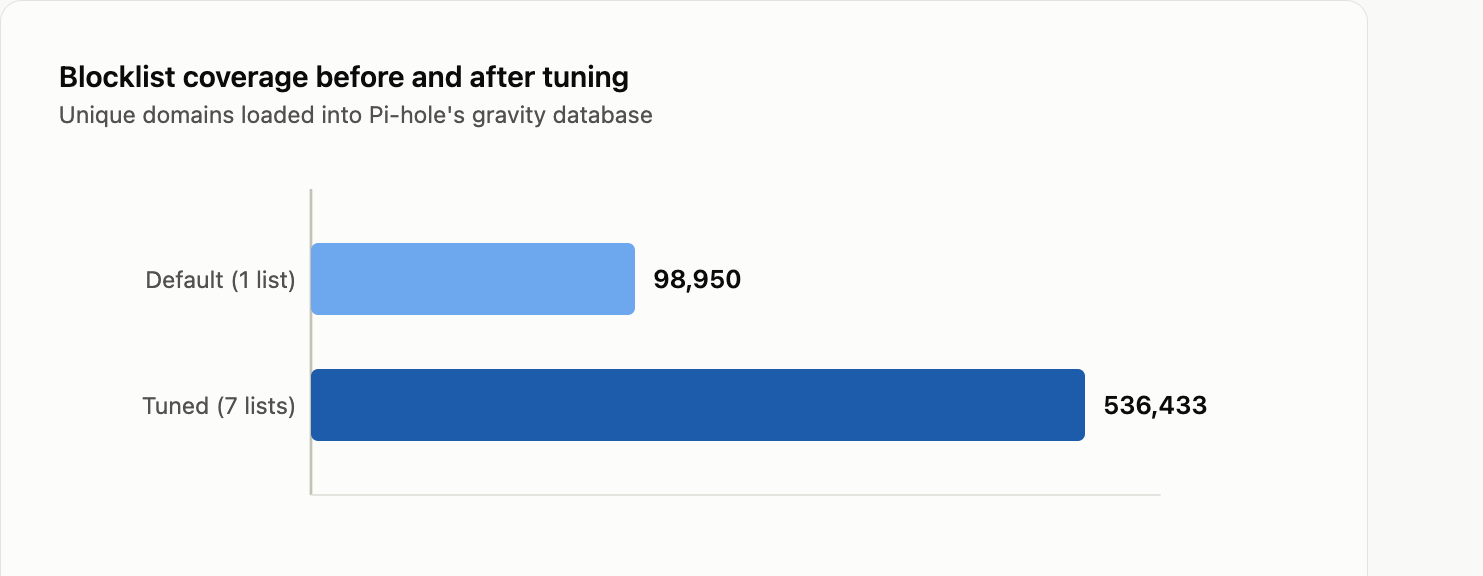
Adding a handful of well-maintained lists took it from 99K to 536K unique domains:
sqlite3 /etc/pihole/gravity.db "
INSERT OR IGNORE INTO adlist (address, enabled, comment) VALUES
('https://big.oisd.nl', 1, 'OISD Big'),
('https://v.firebog.net/hosts/AdguardDNS.txt', 1, 'AdGuard DNS filter'),
('https://v.firebog.net/hosts/Admiral.txt', 1, 'Admiral, anti-adblock and popup scripts'),
('https://v.firebog.net/hosts/Easylist.txt', 1, 'EasyList'),
('https://v.firebog.net/hosts/Easyprivacy.txt', 1, 'EasyPrivacy'),
('https://v.firebog.net/hosts/Prigent-Ads.txt', 1, 'Prigent Ads');
"

pihole -g   # re-pull every list and rebuild gravity
After that, known popup and redirect ad networks (popads.net, propellerads, exoclick, and similar) null-route cleanly.
The ceiling that adding more lists cannot fix
DNS blocking has a structural limit worth being honest about. Pi-hole can only decide whether a domain resolves, it never sees page content. A popup served through inline JavaScript on a site's own first-party domain is invisible to it, there is no third-party domain to block. A browser extension like uBlock Origin works differently, it can inspect and modify the page itself, hide elements, and block scripts regardless of which domain they came from. That is a fundamentally different layer of blocking, not a bigger blocklist. If you run a public "how good is your ad blocker" test, expect DNS-only blocking to plateau somewhere short of 100%, no matter how many lists you add, and pairing it with an in-browser blocker is the only way to close that specific gap.
Whole-home blocking without touching every device
The natural next question: instead of configuring WireGuard per device, why not just set Pi-hole as the DNS server on the home router, and get every device on the network covered automatically?
Whether that is possible depends entirely on whether the router itself can act as a WireGuard (or other VPN) client. A router's own DNS setting only accepts an address it can already route to, and 10.66.66.1 is only reachable through the tunnel, so the router has to be the one holding the tunnel open. Some routers can, OpenWrt, pfSense/OPNsense, UniFi, GL.iNet, ASUS-Merlin firmware all support an outbound WireGuard client. Plenty of stock consumer and ISP routers cannot, some only offer a VPN server (letting you connect into your home network remotely), which is the opposite of what you need here and easy to mistake for the same thing at a glance.
If your router cannot do it and you do not want to add a bridge device (a Raspberry Pi or a small OpenWrt travel router just to hold the tunnel and forward DNS to the rest of the LAN), per-device WireGuard is the realistic option, and it has a genuine advantage over router-level blocking anyway: it keeps working when the device leaves the house.
The simpler alternative: a public DNS resolver
If home-network-wide coverage matters more to you than customizing exactly which lists get used, a public ad-blocking DNS resolver (AdGuard DNS, NextDNS, and others offer this) solves the router problem completely, because it is just a public IP, no tunnel required at all. Point your router's DNS setting at it directly and every device on the network is covered immediately.
The trade-off is real: you give up the ability to whitelist or blacklist specific domains yourself, you give up your own query stats dashboard, and you are trusting a third party's no-logging claims with every DNS query your household makes, instead of keeping that data on infrastructure you control. Self-hosting exists precisely because that trade-off is not free. Which one is right depends on whether you actually want the control, not on which one is technically capable of blocking ads, both are.
Verifying it end to end

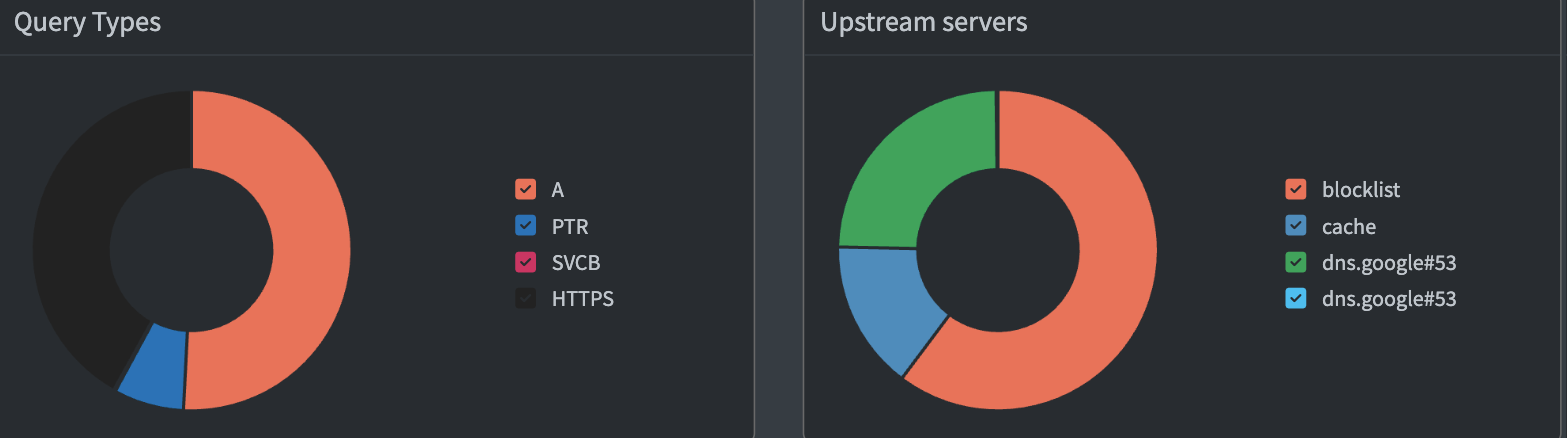
The dashboard is a good sanity check once things are running, but the checks that actually prove the setup is safe are the dig tests against the public IP from a previous section. Run those from a machine outside your own network too if you can, not just from the server itself, a listener that looks closed locally can still be reachable from outside if there is a NAT or proxy layer you forgot about.
Caveats and things to watch for
- Docker publishing bypasses your host's default-deny INPUT chain. A restrictive
iptables INPUTpolicy does nothing for a container's published ports, Docker's NAT rules are evaluated first. Always bind sensitive ports to a specific interface, never trust the host firewall to catch a wildcard bind after the fact. - Never bind a DNS resolver to a public IP, intentionally or by default. Wildcard binds are the easy way to end up an open resolver by accident, and cloud providers treat that as abuse, not a mistake, expect suspension, not a warning.
- One WireGuard keypair per device, always. Reusing a peer identity across devices causes intermittent disconnects that look like flaky wifi but are actually two devices fighting over one tunnel slot.
- A VPN server on your router is not a VPN client. They solve opposite problems and it is an easy mislabel to miss on a quick look through router settings.
- DNS-level blocking has a ceiling. More blocklists help against ad and tracker domains, but inline first-party popups need a browser-side blocker, no DNS list closes that gap.
- Private keys are not recoverable after generation. A WireGuard server only ever stores the public half. If you are scripting bulk peer creation, confirm the private keys made it somewhere durable before any cleanup step runs, not after.
- Test from outside your own network. A port that looks closed from the server's own terminal is the easy case, confirm it from somewhere else too before trusting it.
End to end: one interface binding fixed the startup crash and the security exposure in the same change, per-device WireGuard gets ad blocking to phones and laptops anywhere, and tuning the blocklists closed most, though not all, of the gap on popup ads. The remaining gap is not a configuration problem, it is what DNS-level blocking is.