I Built a Bot to Auto-Apply to Jobs. Then I Had to Build a Way to Survive Its Inbox.

A while back I wrote a bot that logs into LinkedIn, searches for roles that match my profile, screens each one with an LLM, and applies on my behalf while I sleep. It works. A little too well, actually — at 30 applications a day, my inbox turned into a wall of "Thank you for applying" noise. Somewhere in that wall was the one email that actually mattered: a recruiter asking for a call. I didn't trust myself to spot it in time.
So I self-hosted Inbox Zero — an open-source AI email assistant — on my own VPS, wired it up to a free LLM backend via Codex CLI, and taught it to sort my job-search inbox into three buckets: applications, interviews, and rejections. Here's how I built it, and everything that broke along the way.
The stack
- App: Inbox Zero (Next.js, Postgres, Prisma, Redis), self-hosted from source
- LLM: Codex CLI (
gpt-5.4-mini), authenticated via ChatGPT login — no API billing - Deploy: Coolify, Docker Compose, on a VPS I already run a dozen other services on
- Email: Gmail, connected via OAuth + Google Pub/Sub for real-time push notifications
- Domain: Caddy reverse proxy, HTTPS via Let's Encrypt (handled by Coolify)
Why self-host instead of building something from scratch
The instinct when you have "classify my email with AI" as a problem is to reach for a fresh script — a cron job, an IMAP poller, a call to an LLM API. I almost did that. Then I actually looked at what I was about to rebuild: Inbox Zero already ships an AI rules engine (plain-English prompts → label/archive/notify actions), real-time Gmail push notifications via Pub/Sub, a dashboard, and — this is the part that sold me — first-class support for routing its LLM calls through a local CLI agent (Codex CLI or Claude Code CLI) instead of a paid API. That last part meant I could run this entirely on a ChatGPT Plus subscription I already had, with zero additional API cost.
Building that stack myself would've taken a week. Configuring an existing one took an evening — plus several more evenings finding out exactly how many ways a "one weekend deploy" can go sideways.
Setting it up
1. Fork, don't fresh-clone
I forked the repo to a private remote rather than starting from scratch, keeping the original as upstream so I can pull in security fixes later:
git remote rename origin upstream
git remote add origin [email protected]:<you>/<your-fork>.git
git push -u origin main
2. Wire up Codex CLI as the model provider
Inbox Zero's LLM layer already had a codex-cli provider — I just needed to pin the AI SDK bridge package as a dependency:
"optionalDependencies": {
  "ai-sdk-provider-codex-cli": "2.1.2"
}
and set the env vars:
CLI_LLM_ENABLED=true
DEFAULT_LLMS=codex-cli:gpt-5.4-mini
CODEX_CLI_ALLOW_NPX=true
Because the deployment now needed the Codex CLI binary and this extra package baked in, I switched docker-compose.yml from pulling the public prebuilt image to building from source:
web:
  build:
    context: .
    dockerfile: docker/Dockerfile.prod
  pull_policy: build
Codex authenticates via a one-time device-code login (codex login --device-auth — open a URL, punch in a code, approve from your phone), and that session needs to survive redeploys. I mounted a persistent volume at /root/.codex:
volumes:
  - /home/ubuntu/config/inbox-zero/codex-home:/root/.codex
I went with an explicit host path rather than a Docker-managed named volume — it's not strictly necessary (named volumes survive redeploys fine too), but having the auth files sitting somewhere I can ls directly, consistent with how I persist state for every other app on this box, means one less thing to wonder about at 2am.
3. Google OAuth, Gmail API, People API
Self-hosting means your own OAuth app, not the hosted one. Standard stuff: create an OAuth client in Google Cloud Console, add your callback URLs, request the Gmail scopes, enable the Gmail API.
The part that bit me: Google also requires the People API — separate from Gmail API, easy to miss, and its absence doesn't fail loudly. My login flow completed fine on Google's end, but the app then silently failed while fetching my profile info and showed me a completely unrelated error: "Your sign-in link is no longer valid." The real error was sitting in the server logs the whole time:
Error: People API has not been used in project <id> before or it is disabled.One click to enable it, and sign-in worked. Lesson: when an OAuth error message doesn't match the failure you'd expect, check the server logs before you re-read the error copy for the tenth time.
4. Google Pub/Sub for real-time push
Without this, new mail only gets picked up on a polling delay. With it, a webhook fires the moment something lands. Setup: create a topic, grant Gmail's push service account ([email protected]) permission to publish to it, create a push subscription pointing at /api/google/webhook?token=<random-token>.
This is where I lost the most time, and it's worth its own section below.
5. Deploy on Coolify
Point Coolify at the repo, Docker Compose build pack, paste in the env vars, set the domain, deploy. In principle, a five-minute step. In practice — see below.
Everything that went wrong (the actually useful part)
If you're setting up something similar, this section will save you more time than the setup instructions did.
"Invalid environment variables" — a crash loop with a boring cause
First deploy attempt just... crash-looped. Container starts, throws Error: Invalid environment variables, restarts, repeat. The instinct is to suspect something exotic — a bad Docker network, a proxy misconfiguration. It wasn't. Four required env vars (EMAIL_ENCRYPT_SECRET, EMAIL_ENCRYPT_SALT, INTERNAL_API_KEY, DEFAULT_LLMS) had simply never made it into Coolify's saved variable list, despite being on my checklist twice. I'd gotten distracted fighting with a different, unrelated variable (see below) and never circled back.
The fix, once identified, was one paste. The lesson is duller: when a deploy fails with a generic env-validation error, don't theorize — get the actual list of what's configured and diff it against what the app requires, mechanically, before doing anything clever.
The DATABASE_URL red herring
Coolify's compose file used a template default:
DATABASE_URL: ${DATABASE_URL:-postgresql://${POSTGRES_USER:-postgres}:${POSTGRES_PASSWORD:-password}@db:5432/${POSTGRES_DB:-inboxzero}?schema=public}I assumed this nested ${VAR:-default} syntax was somehow breaking when Coolify injected its own env vars, and spent real time trying to "fix" it. It turned out to be a complete non-issue — the string parses as a perfectly valid URL either way, and Postgres connects fine. The actual crash (above) had nothing to do with it. Don't let one intimidating-looking config value become the prime suspect just because it's the ugliest string on the page.
The bug that took the longest to find: Coolify doesn't activate Compose profiles
Once the env-var crash was fixed, the app booted — but the public site returned a 502, and the logs were full of:
PrismaClientKnownRequestError: getaddrinfo EAI_AGAIN dbThe web container was up. db and redis were nowhere to be found in docker ps. My docker-compose.yml gated Postgres and Redis behind a Compose profiles: [all] block — a completely standard pattern for letting people opt into bundled-vs-managed databases. What I didn't know: Coolify's own deploy process doesn't pass a --profile flag when it runs docker compose up -d. Every service without an explicit profile starts (that's how web and the cron container survived); everything gated behind a profile silently never does.
I only found this for certain by SSHing into the VPS and reading Coolify's actual live process list — the literal docker compose ... up -d invocation, with no --profile anywhere in it. That's the kind of thing no amount of reading the compose file itself would have told me; I had to catch the platform in the act.
Fix: stop relying on profiles for anything that always needs to run in this setup — just drop the profiles: key.
  db:
    image: postgres:16
-   profiles:
-     - local-db
-     - all
Caddy routing to the wrong port
Fixed the database, redeployed, still 502 — but now the container itself was healthy (curl localhost:3000 on the VPS returned 200). The reverse proxy just wasn't reaching it. Caddy's own logs had the answer immediately:
dial tcp 10.0.6.6:80: connect: connection refusedPort 80. My app listens on 3000. Coolify auto-generates its Caddy routing label from whatever domain you type in — and if you don't put the port in the domain field, it defaults to 80 instead of introspecting the container's actual exposed port. The fix is a one-line change to the domain field itself:
https://yourdomain.com:3000The :3000 only affects which container port Coolify's proxy targets internally — you still visit the plain https://yourdomain.com in a browser, no port in the URL bar. This exact pattern is documented for multi-port services (like an app that also runs a debug UI on a second port), but it turns out it's needed even for a single-port service the moment the domain field doesn't spell it out.
Deploys take a genuinely long time, and that's expected
Once I switched from the prebuilt public image to building from source (needed for the Codex CLI dependency), a deploy went from "instant image pull" to a real build: pnpm install, a full next build across ~220 routes, a Prisma codegen pass, image export. My first full deploy on the VPS took 41 minutes. That's not a bug — it's pnpm install + next build + Docker's --pull re-verifying the base image, all competing for I/O with a dozen other containers already running on the same box. Worth knowing going in, so you don't spend the first 20 minutes convinced something's actually stuck.
The Pub/Sub role that looks right but isn't
New email test #1: nothing happened. No label, no notification. GCP's Pub/Sub console showed "Published message count: No data available" — meaning Gmail wasn't even successfully sending notifications to my topic. The permissions tab showed [email protected] granted... "Pub/Sub Lite Service Agent."
Pub/Sub Lite is an entirely separate GCP product from regular Pub/Sub — different API, different backing infrastructure. That role grants nothing on a normal topic. It needed to be "Pub/Sub Publisher." Easy to get this wrong: GCP's IAM role search is inconsistent about surfacing the right option for a partial query like "pub," and if you're moving fast, the first thing that appears in a dropdown looks right enough to accept.
The watch that was never actually registered
Fixing the IAM role wasn't enough on its own, either — connecting a Gmail account doesn't automatically register Google's push subscription (the "watch") for that mailbox. That only happens via a periodic cron job (every 6 hours) or a manual trigger endpoint. My deploy's first automatic attempt happened to fire in the few seconds before the app had finished starting up, failed silently, and then just... waited for the next 6-hour window. Visiting /api/watch manually forced an immediate retry instead of waiting it out.
The env var that quietly went missing
Even after fixing both of the above, the watch registration failed again — with an actually clear error this time:
Error: GOOGLE_PUBSUB_VERIFICATION_TOKEN is required to watch GmailSomewhere across several rounds of pasting my full env var list into Coolify's UI, this one variable had silently dropped out. Nothing dramatic — just a copy-paste gap that took three separate debugging sessions to notice, because each individual symptom (crash loop, then 502, then routing, then Pub/Sub permissions) had its own convincing, unrelated-looking root cause. The meta-lesson from this whole section: when you're pasting the same "final" env var block for the fourth time, diff it against the last known-good version instead of trusting your memory that nothing changed.
Chat can talk about my inbox but couldn't touch it
Separately from the rules engine, Inbox Zero also has a conversational chat assistant ("mark all my unread emails as read"). Mine confidently replied that "the inbox connector isn't available" — which was wrong; Gmail was fully connected. The real story, found by reading the actual tool-calling code: Codex CLI, run this way, has no bridge for AI SDK tool-calling — only Claude Code CLI has a purpose-built one in this codebase. So the model had zero working tools and fabricated a plausible-sounding excuse rather than admitting the gap. The classification pipeline that actually matters for auto-labeling email uses structured output generation instead of tool-calling, so it was never affected — but it's a good reminder that "the model answered confidently" and "the model did the thing" are not the same claim, especially once you're routing through a non-default provider path.
What actually solved the original problem
Three rules, added through the normal Assistant → Rules UI, no code involved:
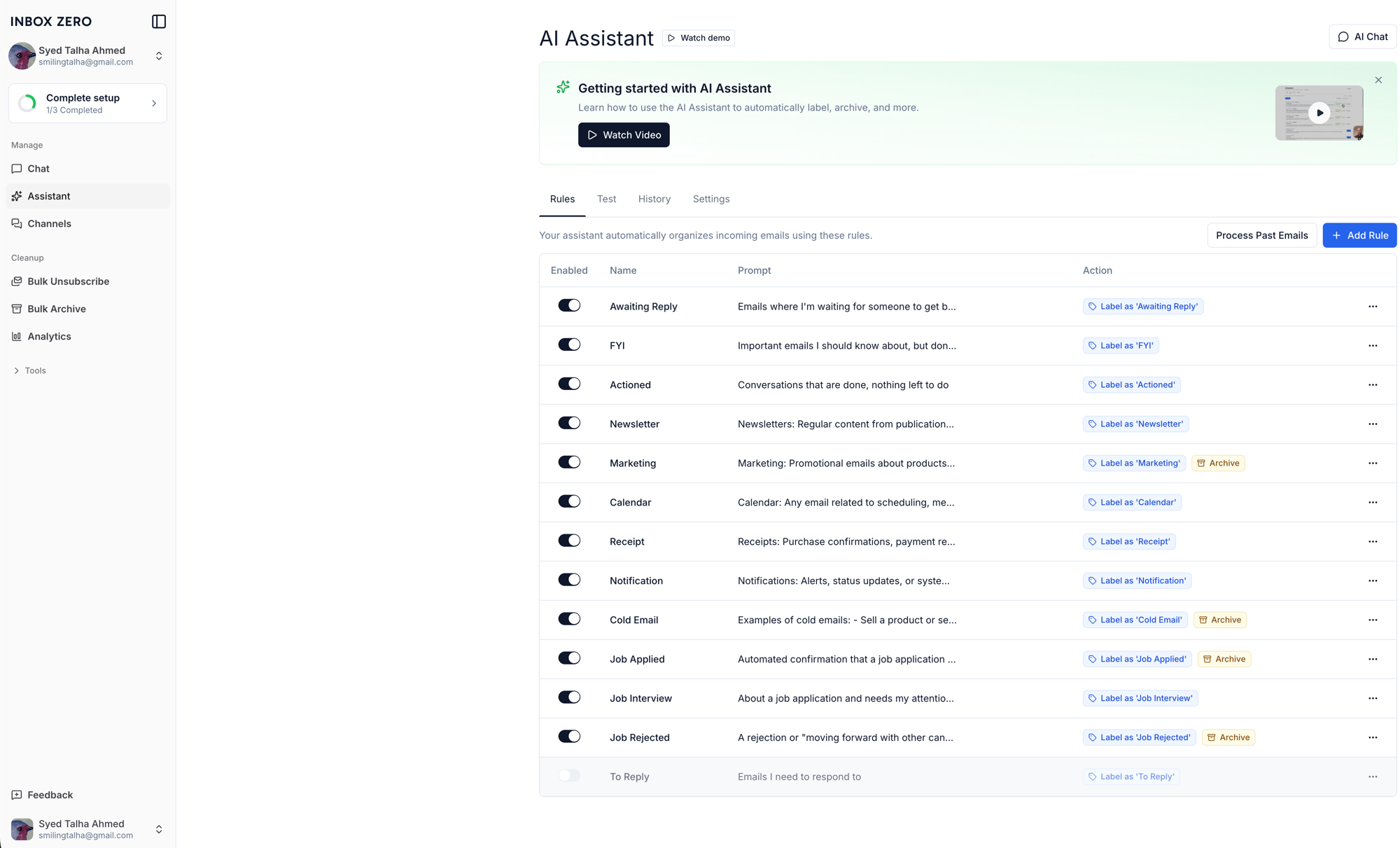
Job Applied
Automated confirmation that a job application was submitted or received — e.g. "Thank you for applying," "We've received your application." Includes automated messages from job boards and applicant tracking systems (Greenhouse, Lever, Workday, iCIMS, SmartRecruiters, LinkedIn, etc). Do not match interview invitations, recruiter messages, assessment invitations, offers, or rejections.
Action: Label 'Job Applied' → Archive
Job Interview
About a job application and needs my attention or represents forward progress — scheduling an interview or call, a coding/technical assessment invitation, a recruiter or hiring manager writing to me directly, a request to pick a time, or any question I need to answer. Do not match automated confirmations or rejections.
Action: Label 'Job Interview' → keep in inbox → notify me on Telegram
Job Rejected
A rejection or "moving forward with other candidates" email. Do not match confirmations or interview invitations.
Action: Label 'Job Rejected' → Archive
Three prompts, each explicitly excluding the other two, so the classifier picks exactly one bucket instead of loosely matching "job-related." The AI evaluates every new email against these the moment it arrives — no sender list to maintain, which matters when your bot is applying through dozens of different ATS platforms you can't enumerate in advance.
Where it landed
New applications get archived silently. Anything from a recruiter or an interview request stays in my inbox and pings my phone within seconds of arriving. Rejections get filed away without me having to see them roll in one by one. I check the dashboard when I feel like it instead of dreading the inbox count.
None of the individual bugs above were hard, exactly. What made this project take longer than expected was that each layer's failure looked exactly like a different layer's problem — an env var issue that looked like a networking issue, a GCP IAM issue that looked like an app bug, a proxy config issue that looked like the app was still crashing. The fix, every time, was the same: stop guessing from the symptom, go find the actual log line or the actual live process, and read what it says.
If you're doing this yourself
- Enable both the Gmail API and the People API — the second one fails silently and downstream.
- If you're on Coolify (or any platform abstracting Docker Compose for you), don't assume it passes through every flag you'd expect — check its actual invocation before debugging your compose file.
- Put the port in your Coolify domain field the moment your app doesn't listen on 80 or 443, even for single-port services.
- Double-check Pub/Sub IAM roles character by character — "Lite" and non-Lite Pub/Sub are unrelated products wearing similar names.
- Keep a single source of truth for your env vars outside the platform UI, and diff against it every time you touch the list.