One Password Vault, Four Backups, and Two the Server Can't Delete
Google and Apple kept warning me about leaked passwords. I moved everything into a self-hosted Vaultwarden on Coolify and backed it up with restic to three countries and Cloudflare R2, with two copies the server itself can't delete.
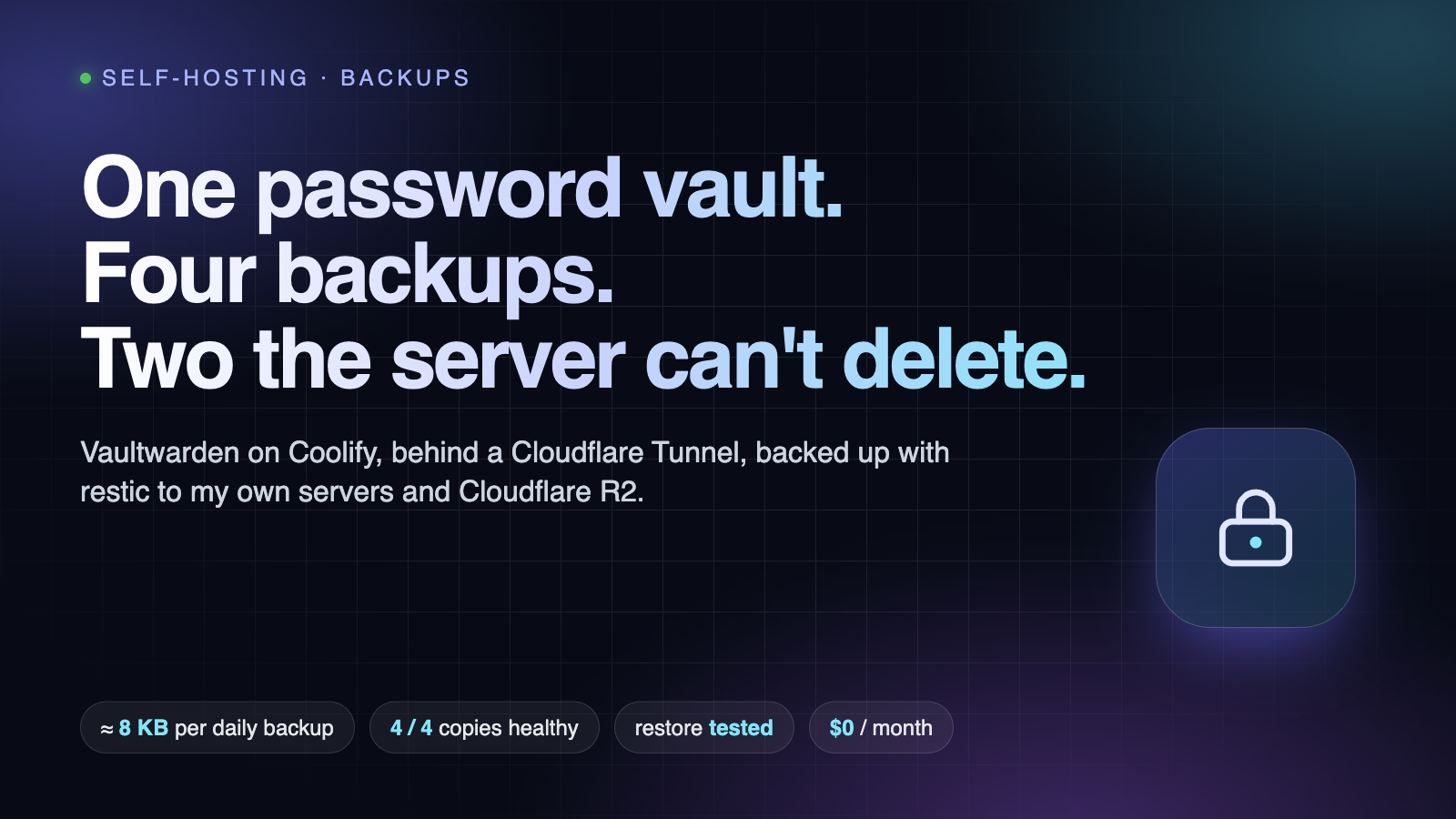
It started with a notification I'd been ignoring for months: "Compromised passwords found." Google said it. Apple said it too, about the same passwords, because Chrome and my iPhone each keep their own copy. Most of them were for sites I signed up to years ago and never opened again, but the nagging was real, and it made me admit something: my passwords lived in two places I don't control and couldn't easily move out of.
So I moved them into a vault I run myself. That part is easy, and there are a hundred guides for it. The part I actually cared about was this: if the server holding my passwords dies, gets wiped, or gets hacked, what's left? This post is about the answer I ended up with. One vault, four backups, and two of those backups can't be deleted by the server that creates them.
Why Vaultwarden
Vaultwarden is an open-source, Rust reimplementation of the Bitwarden server. It speaks the same API, so the official Bitwarden apps for iPhone, Mac and every browser just work. You type your own server URL at login and that's the only difference. It runs happily in a few dozen MB of RAM with SQLite, which matters when it's sharing an Oracle ARM box with forty other containers.
The other reason is the security model. Bitwarden clients encrypt everything with your master password before it leaves the device. The server only ever stores ciphertext. That changes how much the backups need to be protected. Someone who steals a backup gets a pile of encrypted blobs, not my passwords. I still wanted the backups encrypted on top of that, though, and I wanted them to be hard to destroy.
The setup
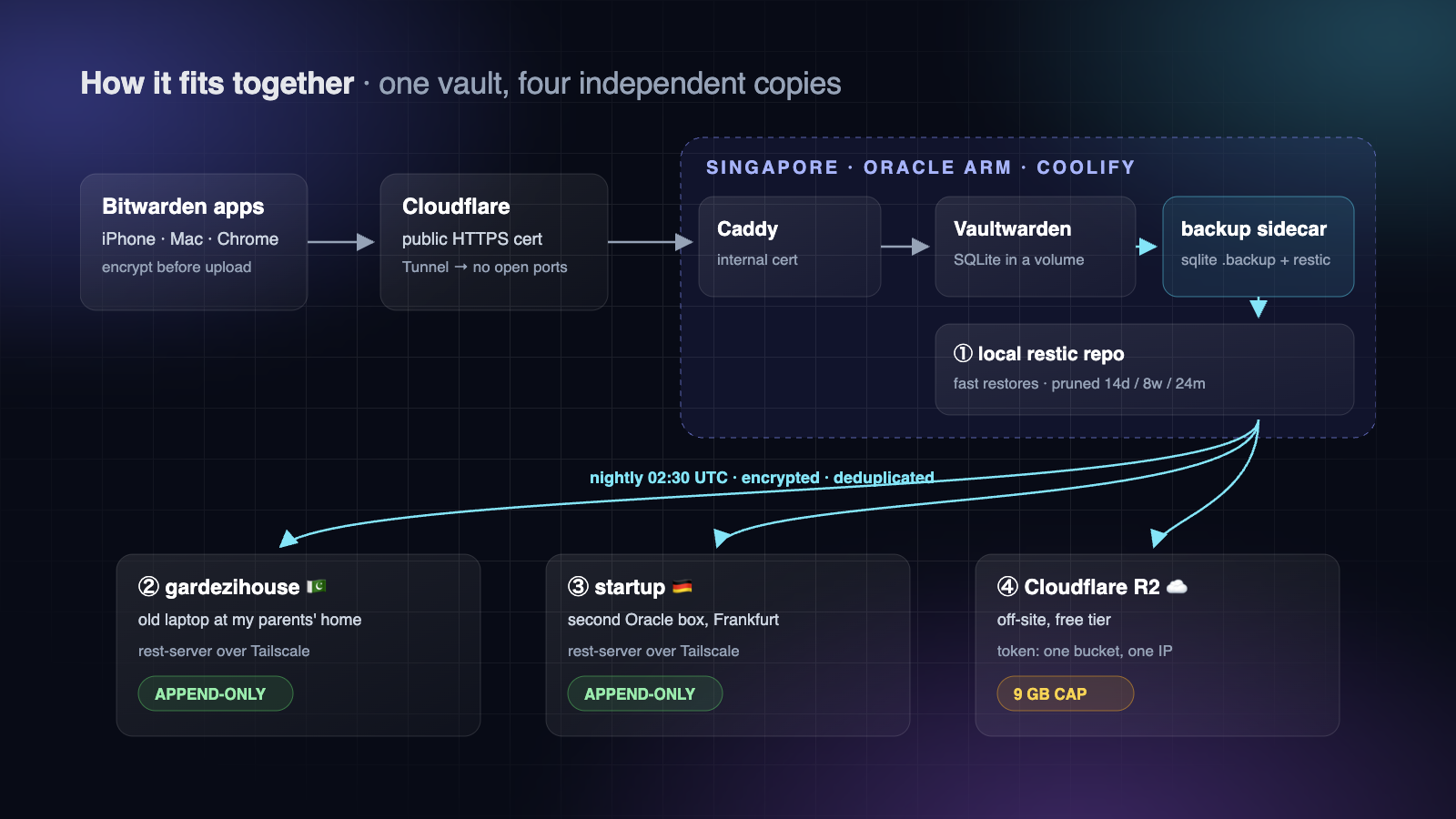
Everything I host in Singapore runs on Coolify, so the vault is a Coolify service with two containers:
- vaultwarden: pinned to a specific version (no
:lateston anything that holds passwords), data in a named volume, sign-ups disabled, the admin token stored as an Argon2 hash rather than plain text, password hints off, rate limits on login and on the admin page. - backup: a small sidecar based on the official restic image. It does nothing until Coolify's scheduler pokes it every night at 02:30 UTC.
Traffic comes in through a Cloudflare Tunnel, which I set up earlier this week after a flaky carrier link between Singapore and Europe started eating connections. The server has no inbound ports open for the web at all.
Push notifications work too. Bitwarden runs a free relay for self-hosted installs: you request an installation ID and key, and a change on my laptop shows up on my phone a second later instead of on the next manual sync.
Four copies, on purpose
The nightly job does this:
- Takes a consistent copy of the SQLite database with
sqlite3 .backup. Copying a live SQLite file withcpcan catch it mid-write..backupcan't. - Runs
PRAGMA integrity_checkon that copy and refuses to continue if it isn'tok. - Adds the server's RSA signing key and any attachments. Restore the database without the key and every logged-in device gets kicked out.
- Pushes the same snapshot to four restic repositories, all encrypted with the same repository password.
The four places:
- Local disk on the same server. Useless if the server dies, perfect for "I deleted something yesterday". Pruned to 14 daily, 8 weekly and 24 monthly snapshots.
- gardezihouse. An old laptop at my parents' home in Pakistan, behind carrier-grade NAT, reachable only over Tailscale.
- startup. A second Oracle box in Frankfurt, also over Tailscale.
- Cloudflare R2. Off-site and off my own hardware entirely.
Three countries, two continents, three different owners of the hardware. And because restic deduplicates, a whole night's backup adds about 8 KB. Ten years of daily snapshots would come to roughly 30 MB. I still put a 9 GB cap on every repository, because R2's free tier is 10 GB and I'd rather the job fail loudly than quietly start costing money.
The part I care about: append-only
A backup that the compromised machine can delete is not a backup, it's a second copy. Ransomware people know this. The first thing they do is look for backup credentials and wipe the backups.
The two copies on my own hardware run restic's rest-server in --append-only mode, bound only to the Tailscale interface, with a per-repository login. Singapore can create new snapshots there. It cannot delete or overwrite old ones, no matter what credentials it has. I tested it the only way that counts, by trying:
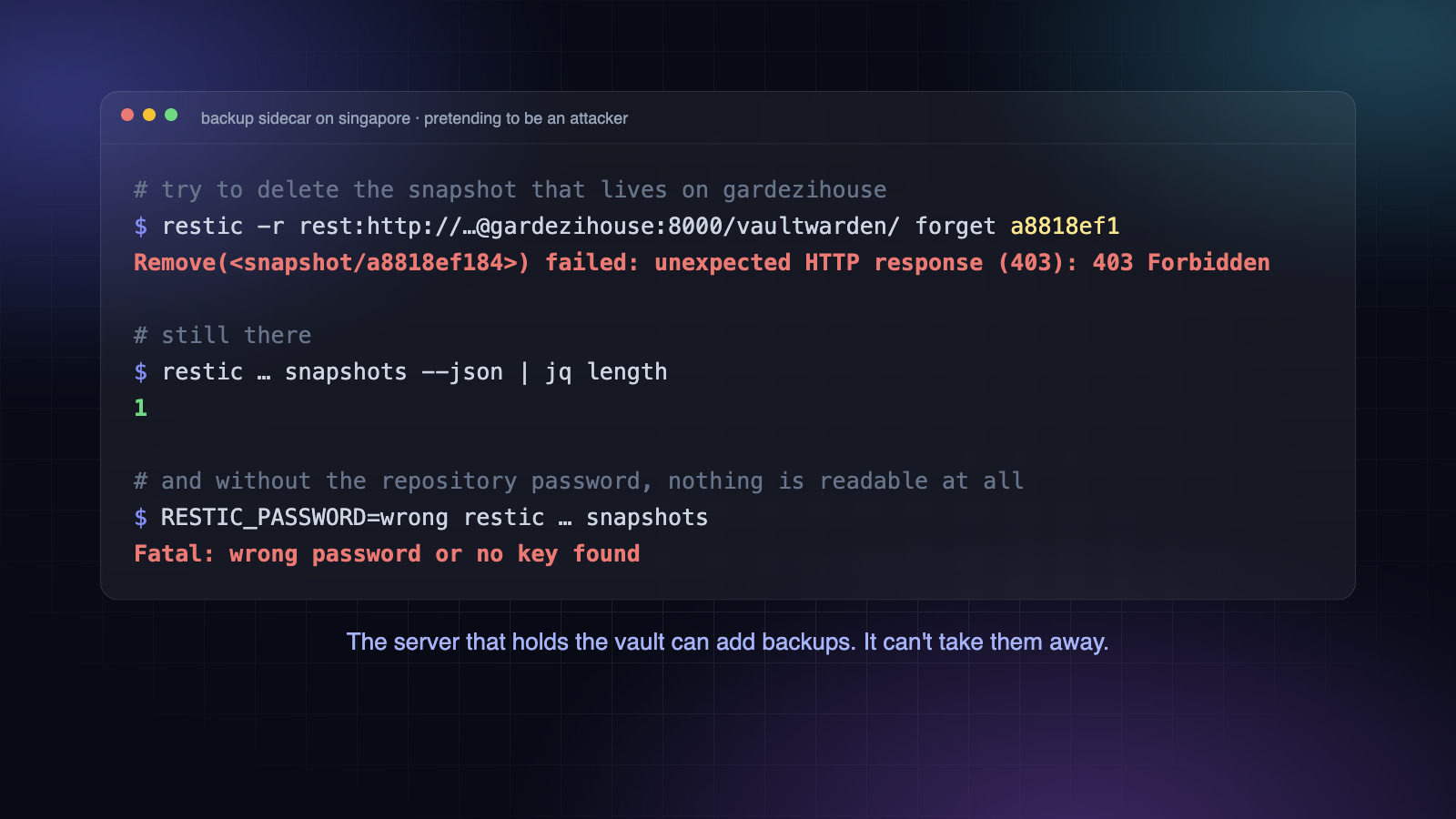
Old snapshots still need to be cleaned up eventually, so each of those two machines runs its own weekly restic forget --prune against its local copy. Retention is decided by the box that holds the backup, not by the box that might get compromised.
R2 can't be append-only in the same way, so I limited the blast radius instead. Its API token only has object read/write on that one bucket, and it only works from my server's IP address. A leaked key is useless from anywhere else.
A backup you haven't restored is a hope
I didn't want to find out on the worst day of the year that something was missing. So before calling it done, I pulled the latest snapshot from the Frankfurt copy, started a throwaway Vaultwarden on top of it, and checked that it came up with the same signing key as the live one:
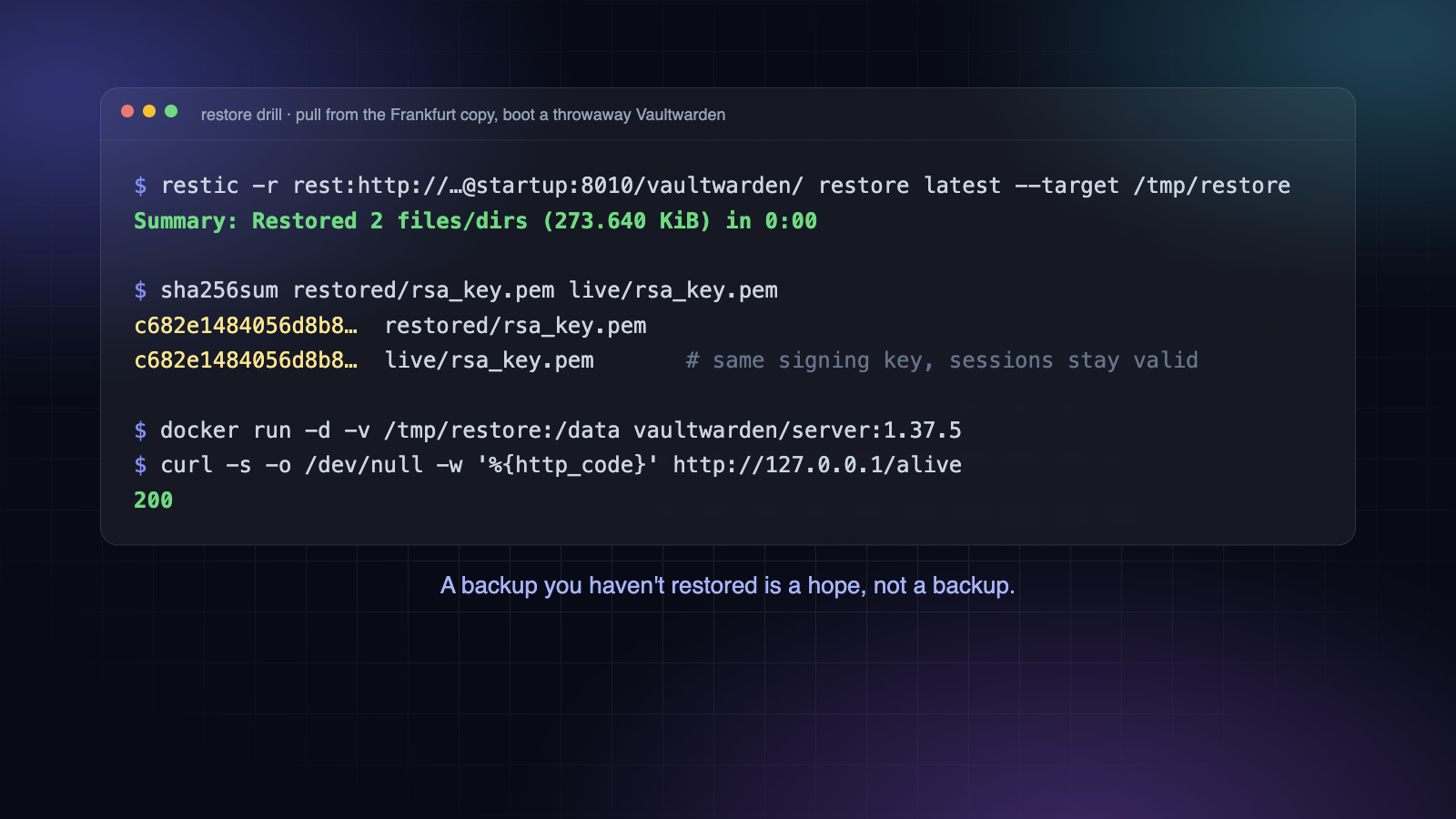
There's also a weekly restic check that re-reads 5% of the stored data in every repository, so silent corruption gets noticed instead of discovered.
Seeing it without logging in anywhere
Backups that only report failures by not existing are the kind you stop trusting. The job writes a small status file after every run, and a tiny Python sidecar next to my Homepage dashboard turns that, plus a few other probes, into JSON for the dashboard's custom API widgets:
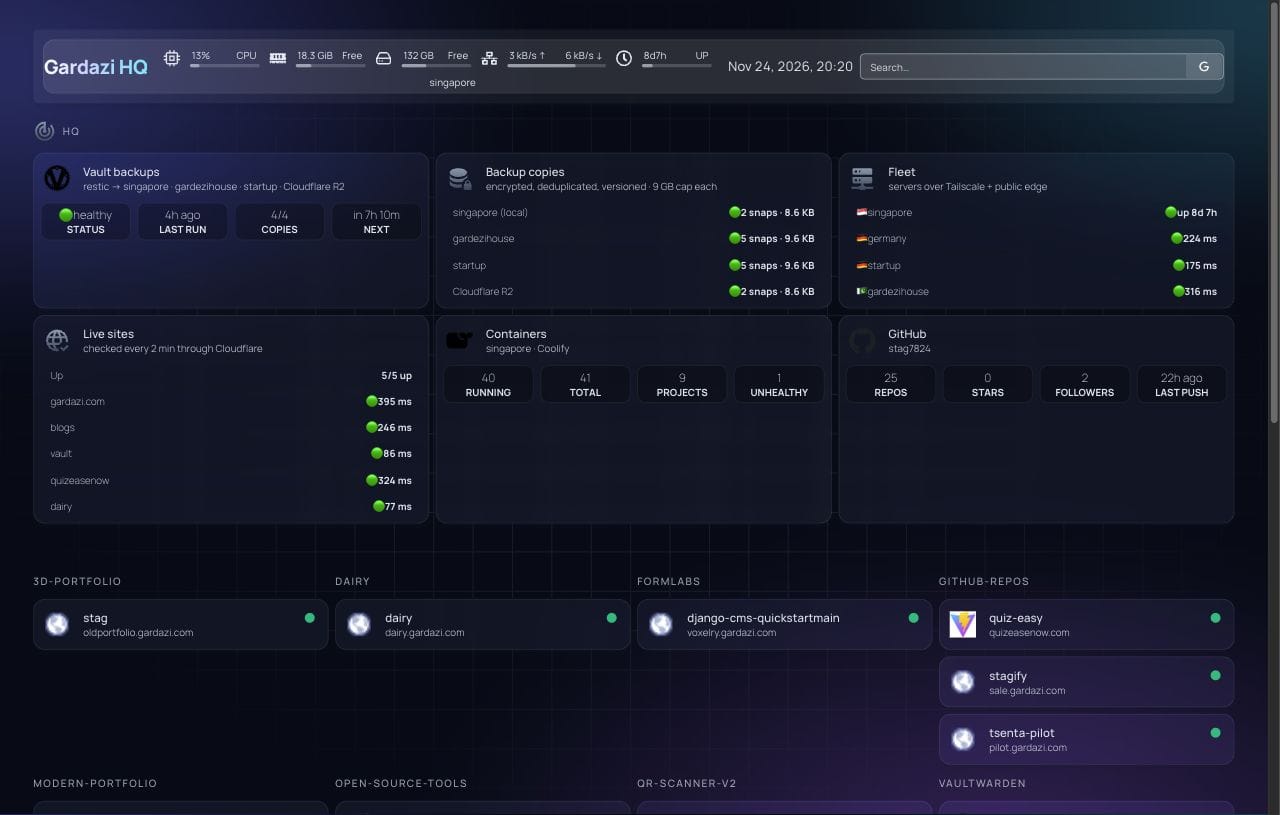
The backup card goes orange if the last successful run is older than 26 hours and red if any destination failed. The same page shows whether each server answers over Tailscale, whether my public sites are up through Cloudflare, and how many containers are running. It's the page I actually look at, so it's where the warning belongs.
Three things that bit me
1. New hostnames can't get a certificate behind a Cloudflare Tunnel. Caddy (Coolify's proxy here) tries Let's Encrypt for every new domain, but the challenge has to reach the server, and with the tunnel in front it never does. The fix was a global Caddy setting that tries ACME first and falls back to Caddy's internal CA:
{
	cert_issuer acme
	cert_issuer internal
}
Cloudflare serves the real certificate to visitors. The hop from the tunnel to Caddy is container-to-container on the same machine, so a self-signed certificate there costs nothing. Hosts that still point straight at the server keep getting real Let's Encrypt certificates.
2. caddy-docker-proxy doesn't notice imported files changing. It only rebuilds its config on Docker events. A new .caddy file sits there ignored until you reload by hand:
docker exec coolify-proxy caddy reload \
  --config /config/caddy/Caddyfile.autosave --adapter caddyfile
3. Coolify writes inline file mounts only once. I first embedded the backup script in the compose file using Coolify's content: feature. It worked, until I updated the script. Coolify had written the file at creation and never touched it again, so the container kept running the old version without any error. I caught it because the status file never appeared. The script now lives as a normal file on the host, mounted read-only, and I trust it more for being boring.
What it costs
Nothing extra. The servers already existed, Tailscale is free at this size, R2's free tier is about a million times bigger than what I store, and the Bitwarden push relay is free for self-hosters. The real cost was an afternoon, and most of that went into proving the backups work instead of assuming they do.
The cleanup of those old leaked passwords is a much smaller job now. They're all in one place, the Bitwarden apps flag the reused ones, and the throwaway accounts I never use just get deleted.
I build and run this kind of infrastructure for myself: Coolify, Cloudflare Tunnels, Tailscale meshes, backups that actually restore, dashboards people want to look at. If you want something similar for your team or your side project, get in touch through gardazi.com.