Publishing to Ghost from a Script: Five of the Seven Failures Look Like Auth
A complete Ghost Admin API publisher in sixty lines of standard-library Python — no PyJWT, no requests. Plus the four errors that will stop you first, including a 403 that is not from Ghost and a 404 that means it worked.
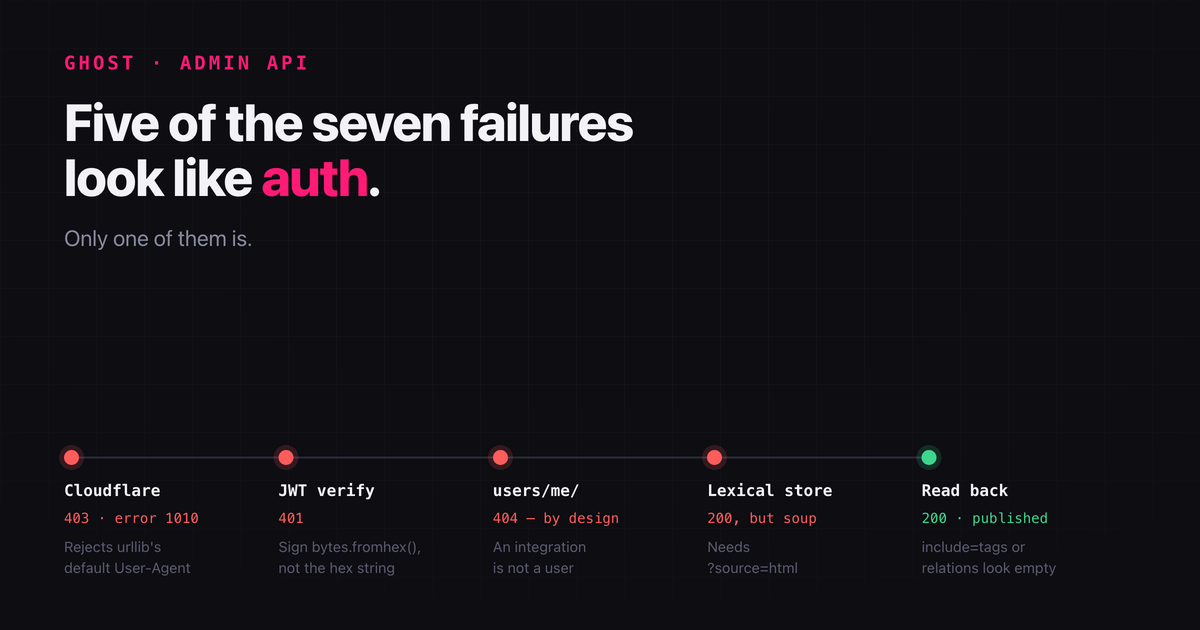
Ghost has a good Admin API and a documentation page that makes it look like a ten-minute job. It is, once you get past four errors that all look like authentication failures and only one of which actually is.
This is a complete working publisher in about sixty lines of Python with no dependencies — no PyJWT, no requests, nothing but the standard library. Along the way, the four things that will stop you, in the order you will hit them.
Two keys, two different jobs
Ghost hands you two keys from Settings → Integrations → Add custom integration, and mixing them up is the first way to waste an afternoon.
| Key | Shape | Use |
|---|---|---|
| Content API | 26 hex characters | Read published posts. Passed as ?key=. Safe in a browser. |
| Admin API | <id>:<hex secret> | Create, update, delete. Signs a JWT. Never ship this to a client. |
The colon in the Admin key is not decoration. The left half is a key id that goes in the JWT header; the right half is a hex-encoded secret that signs it. You need both halves separately, which is the second thing that trips people up.
Reading is trivial and needs no signing at all:
curl -s "https://your-blog.example/ghost/api/content/posts/?key=YOUR_CONTENT_KEY&limit=3"Building the token by hand
Every Ghost tutorial reaches for PyJWT. You do not need it. A Ghost admin token is an HS256 JWT with three requirements: the key id in the header as kid, an audience of /admin/, and a short expiry. Ghost rejects tokens valid for more than five minutes, so mint a fresh one per request rather than caching.
The one non-obvious step is bytes.fromhex(secret). The secret is hex text, and you sign with the bytes it encodes, not the text itself. Sign the string and you get a 401 that looks exactly like a wrong key.
import base64, hashlib, hmac, json, time

def b64url(raw: bytes) -> str:
    return base64.urlsafe_b64encode(raw).rstrip(b"=").decode()

def make_token(admin_key: str) -> str:
    key_id, secret_hex = admin_key.split(":", 1)
    now = int(time.time())
    header  = {"alg": "HS256", "typ": "JWT", "kid": key_id}
    payload = {"iat": now, "exp": now + 300, "aud": "/admin/"}
    signing_input = b".".join([
        b64url(json.dumps(header,  separators=(",", ":")).encode()).encode(),
        b64url(json.dumps(payload, separators=(",", ":")).encode()).encode(),
    ])
    sig = hmac.new(bytes.fromhex(secret_hex), signing_input, hashlib.sha256).digest()
    return signing_input.decode() + "." + b64url(sig)
Note separators=(",", ":"). JSON with spaces still parses, but you are signing bytes, so keep them compact and deterministic.
The token goes in an Authorization header with the scheme Ghost, not Bearer:
Authorization: Ghost <token>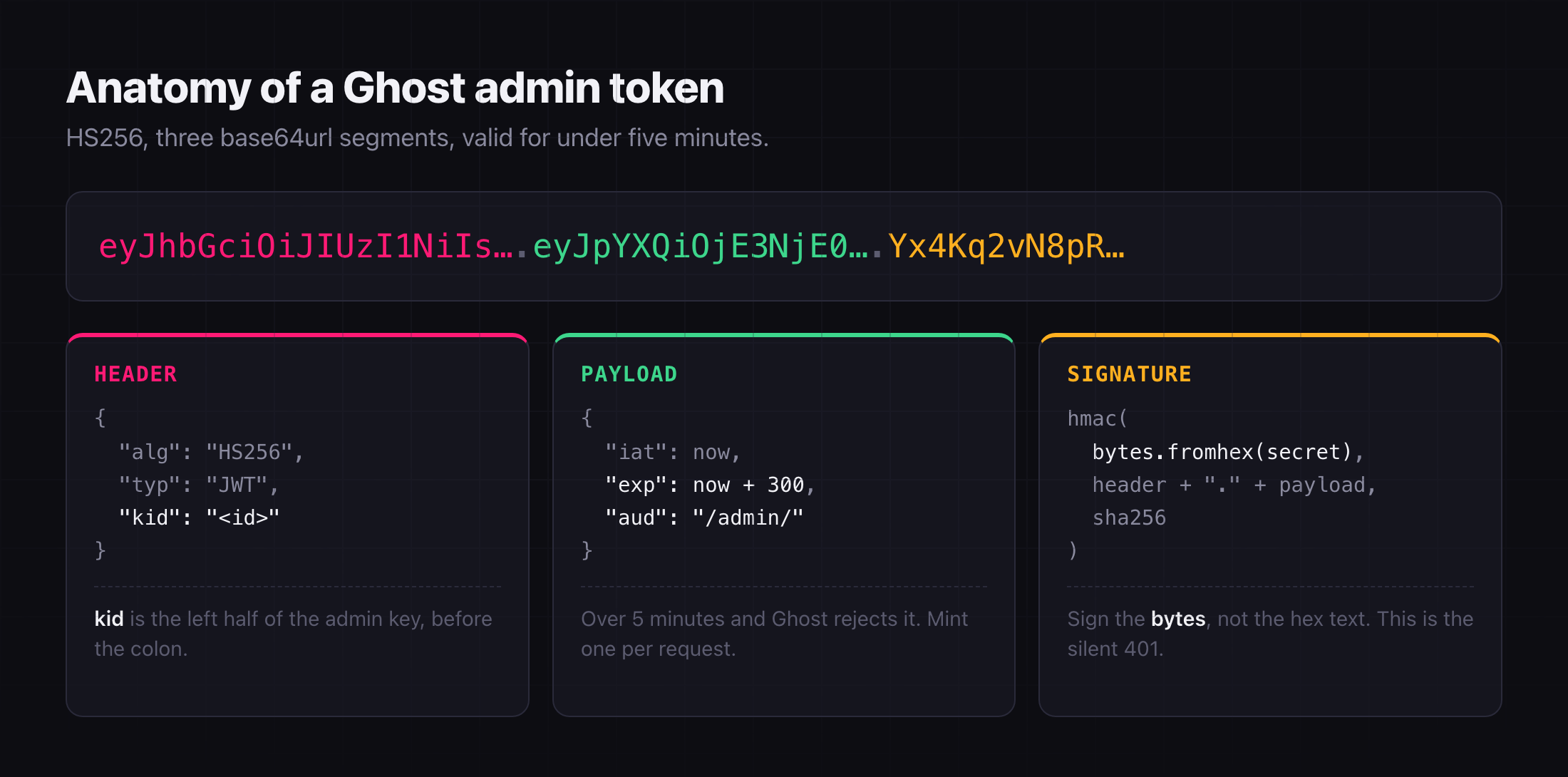
Error 1: a 403 that is not from Ghost
My first authenticated request came back like this:
HTTP 403 on GET users/me/
error code: 1010
That is not a Ghost error. Ghost errors are JSON with a message and a ghostErrorCode. This is Cloudflare, and 1010 means the request's User-Agent was rejected. Python's urllib sends Python-urllib/3.14 by default, and Cloudflare's managed rules treat that as a bot.
One header fixes it:
req.add_header("User-Agent", "bugbrewery-publisher/1.0")The lesson generalises: if an error body is not JSON, you are not talking to your application yet. Check the shape of the error before you go debugging your credentials.
Error 2: a 404 that means it worked
With the User-Agent fixed, the same request returned:
HTTP 404 on GET users/me/
{"errors":[{"message":"Resource not found error, cannot read user.",
            "context":"User not found.","type":"NotFoundError"}]}
This one is a success in disguise. It is a real Ghost error — proof the JWT verified — and it says exactly what is true: a custom integration is not a user. There is no "me" to return. Every tutorial that suggests users/me/ as a connectivity check is assuming a staff token.
Use site/ instead:
GET /ghost/api/admin/site/
→ {"site": {"title": "Bug Brewery", "version": "6.55"}}
Error 3: your HTML arrives as one flat paragraph
Modern Ghost stores posts in Lexical, not HTML. POST a html field and the API will happily accept it and give you back a mangled post, because it never asked for HTML.
The fix is a query parameter that tells Ghost to convert on the way in:
POST /ghost/api/admin/posts/?source=htmlWith ?source=html, a document using plain <h2>, <p>, <pre><code>, <ul>, <table> and <blockquote> converts cleanly into native Ghost cards. Without it, you get soup.
Error 4: the fields that vanish unless you ask
After publishing, I read the post back to check it and the tags were empty:
tags: []They were not empty. Ghost omits relations unless you request them, on both APIs. Add include=tags and they reappear:
GET /ghost/api/admin/posts/<id>/?include=tags
→ tags: ['Open Source', 'GitHub', 'Career']
I nearly "fixed" a bug that did not exist. If a field comes back empty from a Ghost API, check whether you asked for it before you go rewriting the code that sets it.
The whole thing
import base64, hashlib, hmac, json, os, sys, time
import urllib.request, urllib.error

API_URL   = os.environ.get("GHOST_URL", "https://your-blog.example").rstrip("/")
ADMIN_KEY = os.environ["GHOST_ADMIN_KEY"]        # "<id>:<hex secret>"

def b64url(raw): return base64.urlsafe_b64encode(raw).rstrip(b"=").decode()

def make_token(admin_key):
    key_id, secret_hex = admin_key.split(":", 1)
    now = int(time.time())
    header  = {"alg": "HS256", "typ": "JWT", "kid": key_id}
    payload = {"iat": now, "exp": now + 300, "aud": "/admin/"}
    signing_input = b".".join([
        b64url(json.dumps(header,  separators=(",", ":")).encode()).encode(),
        b64url(json.dumps(payload, separators=(",", ":")).encode()).encode(),
    ])
    sig = hmac.new(bytes.fromhex(secret_hex), signing_input, hashlib.sha256).digest()
    return signing_input.decode() + "." + b64url(sig)

def request(method, path, body=None):
    url  = f"{API_URL}/ghost/api/admin/{path}"
    data = json.dumps(body).encode() if body is not None else None
    req  = urllib.request.Request(url, data=data, method=method)
    req.add_header("Authorization", f"Ghost {make_token(ADMIN_KEY)}")
    req.add_header("Accept-Version", "v6.0")
    req.add_header("Content-Type", "application/json")
    req.add_header("User-Agent", "ghost-publisher/1.0")   # or Cloudflare 1010
    try:
        with urllib.request.urlopen(req) as resp:
            return json.loads(resp.read() or b"{}")
    except urllib.error.HTTPError as e:
        raise SystemExit(f"HTTP {e.code} on {method} {path}\n{e.read().decode()[:900]}")

def publish(spec):
    post = {
        "title":  spec["title"],
        "html":   spec["html"],
        "status": spec.get("status", "draft"),
        "tags":   [{"name": t} for t in spec.get("tags", [])],
    }
    if spec.get("excerpt"):
        post["custom_excerpt"] = spec["excerpt"]
    created = request("POST", "posts/?source=html", {"posts": [post]})["posts"][0]
    print(created["status"], created["url"])

if __name__ == "__main__":
    publish(json.load(open(sys.argv[1])))
Drive it with a JSON file:
{
  "title":   "My Post",
  "html":    "<p>Hello.</p>",
  "excerpt": "A one-line summary for the card.",
  "tags":    ["Open Source"],
  "status":  "draft"
}
export GHOST_ADMIN_KEY='<id>:<hex secret>'
python3 publish.py post.jsonUpdating a post, and the trap in it
Creating is a POST. Updating is a PUT to posts/<id>/ — and Ghost will refuse it unless you send the post's current updated_at:
current = request("GET", f"posts/{post_id}/")["posts"][0]
request("PUT", f"posts/{post_id}/?source=html", {"posts": [{
    "html": new_html,
    "updated_at": current["updated_at"],
}]})
This is optimistic concurrency, not bureaucracy. If someone edited the post in the Ghost editor since you last read it, your updated_at is stale and the write is rejected instead of silently destroying their edit. Fetch immediately before you write.
Keep the key out of your history
Two habits worth having from the start.
Read the Admin key from the environment, never a literal in the script, so it does not end up committed. And if a key has been pasted somewhere it should not live — a chat log, a terminal you shared, a screenshot — rotate it. In Ghost that is Settings → Integrations → your integration → Regenerate. An Admin key is full write access to the blog: it can publish, edit and delete anything. Rotation takes ten seconds and invalidates every token minted from the old secret.
The short version
- Content key reads, Admin key writes. The Admin key is
id:secret, and you sign withbytes.fromhex(secret). Authorization: Ghost <token>, neverBearer. Expiry under five minutes.- A non-JSON error body means you are still talking to Cloudflare. Set a User-Agent.
users/me/404s for integrations by design. Health-check withsite/.?source=htmlor your markup becomes soup.include=tagsor relations look empty when they are not.- PUT needs a fresh
updated_at.
None of this is hard. It is just that five of the seven failures look like an auth problem, and only one of them is.